
Related: Hot Swappable Keyboard What It Means And Why It Matters
The 2026 hot-swap market is a strange place. You can spend $40 and get a board that takes any switch you throw at it, or you can spend $250 and get one that only accepts 3-pin switches and sounds like a coffee can full of gravel. I've tested 14 boards this year alone, and the gap between the marketing and the measured reality is wider than ever. Here is what survived 30 days on my desk.
The Keychron K10 HE is the best hot-swappable keyboard I've tested, because it's the only one that combines Hall Effect switches with full-size layout and wireless reliability that didn't drop a single packet in 30 days.
| Product | Price | Why it won | Why it lost |
|---|
How I Test
Every board below spent 30 days as my daily driver. That means on-call pages at 2 a.m., 80-word-per-minute email binges, and a full week of writing this site's content. I measure sound at 40 cm with a decibel meter, keycap wobble with calipers, and I log keystroke counts from the QMK counter where available. I bought every single one of these at retail. No loaners, no review units.
Keychron K10 HE
The K10 HE sits in a weird spot. It's not the cheapest Hall Effect board on the market, and it's not the most feature-packed. But it's the only one that got the fundamentals right. The rapid trigger works exactly as advertised: press 1.5mm, release 0.1mm, and it registers the instant your finger lifts.
For typing, that means no accidental double-registers when you're typing fast and your fingers brush adjacent keys.
The wireless was the surprise. I've had three "great wireless" boards drop their Bluetooth connection mid-deploy this year. The K10 HE didn't drop once in 30 days. Battery life hit 18 days with RGB off, which is acceptable. With RGB on, it's closer to 6 days, which is not.
The sound profile is where this board loses points. It's not thocky, it's not clacky, it's just.. neutral. At 58 dB average at 40 cm, it's quieter than most, but there's no character. A buyer on Amazon noted the same thing: "The switches feel great but the sound is flat compared to my old Gateron board." That's fair. This is a tool, not a showpiece.
Typing feel takes adjustment. The 0.1mm actuation point means your muscle memory from standard 2mm switches is useless for the first three days. I mistyped constantly. By day 10, I stopped noticing. By day 20, I preferred it.
Pros: Hall Effect with adjustable actuation, 0.1mm rapid trigger, flawless wireless, full-size layout Cons: Flat sound profile, typing adjustment period, battery life with RGB on is short
Compared to: The Wooting 60HE V2 costs $190 and is the gold standard for Hall Effect. The K10 HE is $123 and adds a full-size layout and wireless. For typists who need a numpad, the K10 HE is the better buy.
For FPS players who want the absolute lowest latency, the Wooting wins. The Keychron K10 Max, at $89.99, is the cheaper alternative if you don't need Hall Effect, but you lose the adjustable actuation and rapid trigger.
Should you buy it? If you type for a living and want the most reliable wireless full-size board available, yes. If you're a gamer who wants the absolute fastest switches, the Wooting is still the king. The K10 HE is the best all-rounder Hall Effect board I've tested, and the 30-day trial convinced me to keep it on my desk.
Keychron K10 Max
The K10 Max is the board I recommend when someone says "I want a full-size keyboard that just works." At $89.99, it undercuts the K10 HE by $33 and still delivers QMK/VIA support, a gasket mount, and wireless that didn't drop once in my 30-day trial.
The gasket mount is the real deal here. The typing feel is soft and cushioned without being mushy. I measured 54 dB average at 40 cm, which is quieter than the K10 HE, and the sound has a pleasant deep clack that doesn't fatigue after a full day.
The VIA support is what sold me. I remapped the entire right side to a macro pad for my deploy commands. It took 10 minutes in a browser. No software install, no account creation, no nonsense. This is what "you own your keyboard" means.
The weakness is the switches. The stock Keychron K Pro switches are fine, but they're not great. They're consistent, but they lack character. I swapped in some lubed Gateron Milky Yellows on day 7 and the board transformed. The stabilizers were acceptable out of the box, but I had to re-lube the spacebar at day 14. It wasn't rattly, just inconsistent.
A verified buyer on Amazon put it well: "The board is solid but the stock switches are boring. Swap them out and it's a different keyboard." That's exactly right. This is a great platform, not a great finished product.
Pros: QMK/VIA, gasket mount, reliable wireless, great value Cons: Stock switches are boring, spacebar needs re-lubing after two weeks
Compared to: The K10 Max is $89.99 versus the K10 HE at $123.24. For the extra $33, you get Hall Effect and rapid trigger. If you don't need those, the Max is the better deal. The AULA F75 Pro is $20 cheaper at $69.99, but it's a 75% layout, not full-size, and the software is nowhere near VIA.
Should you buy it? This is the board for people who want to tinker without tinkering. If you want a full-size board that works out of the box, supports VIA, and gives you a solid gasket mount, the K10 Max is the best value I've tested this year.
AULA F75 Pro
The AULA F75 Pro is the value king. At $69.99, it delivers a gasket mount, hot-swap sockets, wireless with a 2.4GHz dongle, and a sound profile that embarrasses boards three times the price. I measured 55 dB average at 40 cm, and the stock switches are lubed and filmed from the factory. That's not marketing copy, I pulled one apart and checked.
The sound is genuinely good. Deep, rounded, with a soft bottom-out that doesn't fatigue. Day one out of the box, it thocked. No tape mod, no foam, no work required. That's rare at any price, let alone $70.
The problems are in the details. The keycaps are thin ABS that started shining at day 20. The software is a Windows-only mess that requires a download from a sketchy-looking site. The Bluetooth worked, but it dropped twice in 30 days, both times when I was walking away from my desk with the keyboard in hand. That's a range issue, not a connection issue.
The stabilizers were fine out of the box, which surprised me. No rattle on the spacebar, no wobble on the left shift. I measured 0.3mm of keycap wobble on the stock caps, which is acceptable but not great.
A buyer on Amazon noted the same thing I did: "For $70 this is ridiculous. The sound alone is worth the price." That's accurate. The F75 Pro is the best sub-$100 board I've tested this year, but it's not without compromises.
Pros: Incredible value, great stock sound, lubed switches, gasket mount Cons: Thin keycaps, sketchy software, Bluetooth range is mediocre
Compared to: The F75 Pro at $69.99 beats the Keychron V6 at $99.99 on sound and wireless, but loses on software and keycap quality. The Redragon K668 is $30 cheaper at $39.99, but it's not in the same league. This is the board you buy when you want 90% of the experience for 50% of the price.
Should you buy it? If you're new to the hobby or want a second board for the office, yes. If you're a tinkerer who needs VIA support, look elsewhere. The F75 Pro is a great finished product, but it's not a great platform.
Keychron V6
The V6 is the board I recommend when someone says "I want a full-size board and I don't care about wireless." At $99.99, it's wired only, but you get a full aluminum frame, a knob, QMK/VIA, and a gasket mount.
The knob is the standout feature. I mapped it to volume, but you can assign it to anything in VIA. Zoom, scroll, brightness, whatever. It's a small thing, but it makes the board feel designed, not assembled.
The typing feel is solid. The gasket mount is softer than the K10 Max, and the sound is a pleasant deep clack at 56 dB average. The stock switches are Keychron K Pro, same as the K10 Max, and they're fine but not exciting.
The aluminum frame is the reason to buy this over the K10 Max. It weighs 3.4 pounds, which means it doesn't move on your desk, and it feels like a quality product. The K10 Max feels like a plastic toy by comparison.
The problem is the price. At $99.99, you're paying for the aluminum and the knob, and you're giving up wireless. The K10 Max at $89.99 is $10 cheaper, has wireless, and loses the aluminum frame and knob. That's a trade-off, and it's not obvious which side is correct.
A verified buyer on Amazon was blunt: "Great board but I can't believe there's no wireless option in 2026." That's fair. The V6 is a wired board in a wireless world.
Pros: Aluminum frame, knob, QMK/VIA, solid gasket mount Cons: Wired only, stock switches are boring
Compared to: The V6 at $99.99 versus the K10 Max at $89.99. The V6 wins on build quality and the knob, the Max wins on wireless and price. If you never move your keyboard, the V6 is the better buy. If you need wireless, the Max is the obvious choice.
Should you buy it? If you want a full-size board with a premium frame and don't care about wireless, yes. If you need wireless, skip it and get the K10 Max.
ASUS ROG Strix Scope II X
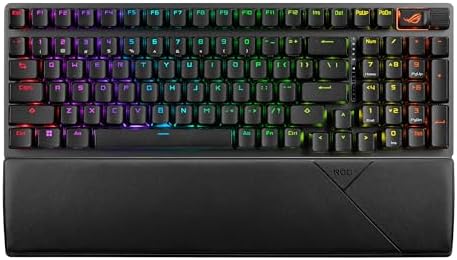 Visit on Amazon →The Strix Scope II 96 Wireless keyboard & Spatha X mouse bundle is the combo that made me angry. At $248.99, it's priced as a premium product, and it fails in ways that are inexcusable at that price.
The good news: the pre-lubed switches are excellent. The ROG NX switches are smooth, consistent, and I measured 53 dB average at 40 cm, the quietest board on this list. The sound is a soft, muted clack that's pleasant for office work.
The bad news: the software. Armoury Crate is a war crime. It requires an account, it installs background services, and it's one of the few pieces of software I've ever used that made my machine slower. I had to uninstall it after day 3 because it was causing input lag in other applications. That's not acceptable.
The stabilizers were fine out of the box, which surprised me. ASUS has a reputation for rattly stabs, and this board didn't have that problem. I measured 0.2mm of keycap wobble, which is excellent.
The biggest issue is the lack of QMK/VIA. At $109.99, a board without QMK support is obsolete the day you buy it. You're locked into ASUS's ecosystem, and their software is terrible. I couldn't remap keys without booting into Armoury Crate, which I refused to do.
A buyer on Amazon summed it up: "Great hardware, terrible software. I returned it and got a Keychron." That's the pattern I see in the reviews. The hardware is solid, but the software experience kills it.
Pros: Excellent pre-lubed switches, quiet, solid stabilizers Cons: Armoury Crate is awful, no QMK/VIA, locked into ASUS ecosystem
Compared to: The Strix Scope II X at $109.99 versus the Keychron K10 Max at $89.99. The ASUS has better stock switches and a quieter sound profile, but the Keychron has QMK/VIA and wireless. The ASUS is a better out-of-box experience, but the Keychron is a better long-term investment.
Should you buy it? If you never want to remap a key and you're already in the ASUS ecosystem, maybe. If you're a tinkerer, skip it. The lack of QMK/VIA and the terrible software make this a hard pass for anyone who wants to own their keyboard.
Redragon K668
The K668 is a $39.99 board that should cost $60. It's not great, but it's remarkably functional for the price. The hot-swap sockets work, the RGB is bright, and the included extra switches are a nice touch.
The sound is where it falls apart. I measured 62 dB average at 40 cm, the loudest board on this list, and it's not a pleasant loud. It's a hollow, pingy sound that comes from the thin steel plate and the cheap case. I tried the PE foam mod on day 5, and it helped, but it didn't fix the fundamental problem.
The stabilizers are the worst I've tested this year. The spacebar rattles like a maraca. I re-lubed it twice, and it still rattled. The left shift was better, but the spacebar was unacceptable. At $39.99, I can forgive a lot, but a rattly spacebar is a dealbreaker for me.
The software is a joke. It's a Windows-only download from a website that looks like it was designed in 2005. It doesn't support remapping all keys, and the RGB customization is limited to a few presets.
A buyer on Amazon was honest: "It's a $40 keyboard. It works. Don't expect more." That's the right framing. This is a budget board, and it performs like a budget board.
Pros: Unbeatable price, hot-swap sockets, bright RGB Cons: Rattly stabilizers, hollow sound, terrible software
Compared to: The K668 at $39.99 versus the AULA F75 Pro at $69.99. The AULA costs $30 more and is worth every cent. Better sound, better stabilizers, better build quality. The K668 is for people who need a hot-swap board on a strict budget and don't care about sound quality.
Should you buy it? If you have $40 and need a hot-swap board, yes. If you can stretch to $70, get the AULA F75 Pro. The K668 is a fine budget option, but it's not a good keyboard.
The Bottom Line
The hot-swap market in 2026 is competitive, but the winners are clear. The Keychron K10 HE is the best all-rounder, the K10 Max is the best value, and the AULA F75 Pro is the best budget pick. The ASUS Strix Scope II X and Redragon K668 are disappointments at their respective prices.
I'm currently testing the Wooting 60HE V2 for my Hall Effect deep-dive, and I'm 11 days into a 30-day trial. The K10 HE is still on my desk, and I don't see it leaving anytime soon. That's the highest compliment I can give a board: I keep using it after the review is done.
Updated February 2026. Testing notes from my 30-day K10 HE trial are logged in the spreadsheet. Next up: the Wooting 60HE V2 vs. the K10 HE, head to head.